
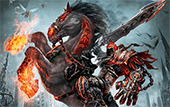
After installing Darksiders on their PCs, some users have complained that the game gets stuck at a black screen after the THQ and Vigil Games logos disappear.
This fix should allow you to load Darksiders with no problem.
Common Black Screen Fix
- Open your game folder (default is Program Files)
- Go under
\media\videos - Delete
AMD_Logo_movie.wmv
That should help most users get their game started. Additionally, you could encounter a black/blank screen in Darksiders if the game’s resolution was set to one that your monitor does not support. In that case, you need to delete another file.
Rarer Black Screen Fix
- Open your games app data folder
- Win XP:
C:\Documents and Settings\*YOURNAME*\Local Settings\Application Data\Darksiders - Win 7/Vista:
C:\*YOURNAME*\AppData\Local\Darksiders - Delete
options.dopt
Hope those help! Additionally, if you’d like a guide to the collectible item locations for Darksiders, check out this article.



i have found this:
Please note that Darksiders does not support Microsoft® Windows®
95/98/NT/2000, Beta/Release Candidate versions of Windows 7, or
64-bit versions of any operating system.
so for the people whit a 64-bit system maybe this is the problem.
for the record, I had this installed on Win 7 x64
@buffy2nl – im running this game with windows 7 64bit with no problems….
i tried tht but its not work
and i didnt find amd logo video
but i delete options dopt
,still now screen become black after i select slot
umm can u just try to download darksiders 2 savefile.becoz mine work for me but what, I didn’t understand is my darksiders 2 don’t have cutscene although its playing 60fps, I feel something dull playing this game
I have the same black screen problem… I can’t find that AMD_LOGO_movie.WMV file and opions.dopt… Can someone help me~~~… I’ll be waiting for any replies.
thanks this fix helped:)
Deleting the AMD logo video worked, many thanks.
Thank you so much!
ALL HAIL THE COMMON FIX! EFF AMD! They made a file that effed with my game! I’m lucky searching Windows for that sucker and then sending it to Recycle Bin Hell worked! Didn’t even have to try additional fixes. All Hail SolidlyStated…now goodbye, cuz I’ll prolly never be back here again. 😀
Right on!
Thank you, right on the spot!
THANK YOU.
This didn’t fix a thing, it just send me directly to the black screen, nothing else! Help ppl.
Hey Jonas, check the first page of comments. There are some other suggestions for solving various black screen issues.
hey, could you please someone to help me on installing this Darksiders game. I really tired to installing this in my pc, not installed yet. Pls help me!!!
Thanks
Hello,
I too am having the black screen issue. I know the problem is my monitor settings, but I am not going to run out and buy a new monitor to fix this one issue. I normally go into the config. file and manually adjust it. I have had to do this with may games now and have just gotten use to it. But with this game there isn’t a config. file to mess with. So for those of still having this problem, what do we do? Ask for a refund?
Can not find the AMD_Logo video in the media\video\ folder
Deleted the options.dopt file
No change
due thnx its wrking
u dont noe wat i owe u!!!!!!!!!!!!!!
thx a lot
I deleted the AMD logo video and the options.dopt file and still not working.
I can hear the sound of the menu buttons but still the screen is black.
i hav done everytyn bt still d black screen appears.wat next guys.need help right now
Sorry kobby, this issue has been hit or miss with some people and their PCs. It could be something totally unrelated to this particular bug. Be sure to get all the appropriate updates for your computer,close out any unused programs to make sure they arent interfering, and temporarily disable any antivirus to see if thats blocking anything. (all depends on if you can hear the game continuing to play or not whether its actually a video related issue).
Good luck
Please have u seen any solution
Okay… so I’ve managed to obtain the most major issue with this game.
And yes, it is the problem in which is thread is referring to.
I run the game, I see THQ logo in maybe half a second and the game crashes.
I’ve tried EVERYTHING this thread has told me, and I still can’t fix my darned problem.
My specs are shown in this link: http://gyazo.com/678d684658c4b50e444e65e55303ddda
I’m not a super computer-scientist person, so any help possible not mentioned in the thread already would be appreciated at my highest.
I got this game on xbox though, but I’m too lazy to switch from PC to xbox whenever I want to play the game, which is why I bought it. And I want to fix this because I spent a good £20 on it on Steam.
Again, any help would be sincerely appreciated.
Thanks, – Harold.
Also, I managed to find and delete the AMD_LOGO thing, but I did not manage to find the options thing. I searched through the whole darksiders folder, and no, still did not find it.
I tried every other solution I could read, even youtube, nothing works, nothing!
So… I’ve tried changing resolution, updating all my drivers, reinstall the game and then removing the intro movies as well as trying to find options.dopt however, I didn’t find the file now either.
Still doesn’t work.
I might have found the source of my problem.
I installed Darksiders on my laptop, which is a Windows 7 computer.
It worked perfectly fine (Except a few crashes, but what to expect from an xbox game, merely optimized for pc?)
But no matter what I do on my Windows 8 desktop computer, the game will not run no matter what I’ve done.
Thanks a lot. It worked. Thanks Again
Thanks a lot. It worked. Thanks Again:-)
Thz for ur help… I am now on the game play…
Move the whole game to your OS drive ( probably C: ) and SHAZAM the game works fine.