

This article is part of our series: The Logitech G27 Racing Wheel for Casual Racing Gamers. Here, we will cover setting up your G27 racing wheel to play Need For Speed: Shift 2 Unleashed (PC).
The 17th game in the series, Shift was developed by Slightly Mad Studios and published for Electronic Arts. Shift 2 expands on the original (a cross between simulation and arcade racing where racing takes place on a track) with 145 cars from 37 manufacturers.
Solid Tip: Looking for G27 drivers or Logitech Profiler software? Get it here.
| Logitech G27 Solid Series Articles | |
|---|---|
| 1. Casual Gamer vs Simulation Gamer | 11. Test Drive Unlimited |
| 2. Setting Up Your G27, Made Easy | 12. Test Drive Unlimited 2 |
| 3. Need For Speed: Carbon | 13. Burnout Paradise |
| 4. Need For Speed: Pro Street | 14. Race Driver: GRID |
| 5. Need For Speed: Undercover | 15. Split Second |
| 6. Need For Speed: Shift | 16. GTR Evolution |
| 7. Need For Speed: Shift 2 | 17. DiRT 2 |
| 8. Need For Speed: Hot Pursuit | 18. DiRT 3 |
| 9. Need For Speed: The Run | 19. Blur |
| 10. Need for Speed: Most Wanted | |
Need for Speed: Shift 2 Unleashed has even better wheel support than its predecessor! Shift 2 Unleashed supports a plethora of wheels from Logitech, Thrustmaster, and Fanatec. There are also custom wheel settings for those that aren’t on the preset list. Still no built-in shift LED support, though.
Force feedback is strong and accurate right out of the box- a blessing for us casual racing fans.
The presets come completely labeled with an actual diagram of each wheel. The wheels bindings are already mapped for you, but you can set them yourself if you would prefer.
Shift 2 Steering Wheel Support
Right out of the box, Shift 2 Unleashed has the following control presets to choose from. The wheels also have both a combined pedals preset and a separate pedals preset.
- Logitech G25
- Logitech G27
- Logitech Driving Force
- Logitech Driving Force GT
- Logitech Driving Force Pro
- Logitech MOMO
- Logitech MOMO Force
- Fanatec Porsche 911 Turbo sequential
- Fanatec Porsche 911 Turbo gated
- Thrustmaster Ferrari F430 FF
- Thrustmaster Ferrari GT Experience
- Thrustmaster RGT FF Clutch
- Custom Wheel
- Custom GamePad
- Xbox 360 controller for Windows

Shift 2's detailed presets
Need for Speed: Shift 2 G27 SettingsOut of the 16 games I have reviewed for the Logitech G27, Shift 2 Unleashed is perhaps the easiest to setup. The game handles all the options so you don’t need to attempt to setup anything in the profiler. I always add my racing games into the profiler, though for good measure. It is completely optional:
Need for Speed: Shift 2 Game OptionsShift 2’s real flexibility is in the game options on the title screen. Here you can set your driving aids, key bindings, force feedback and steering settings, and select your presets.
That’s all there is to it! This game practically sets itself up and will work great with just plug and play. Enjoy! |
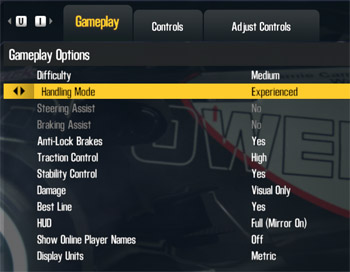 Gameplay Options 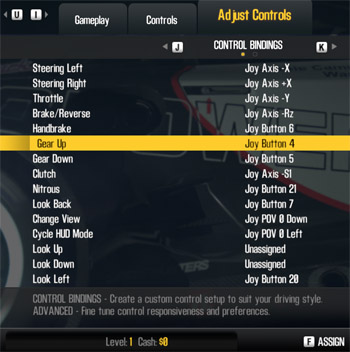 Control Bindings 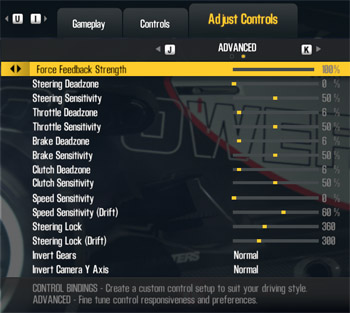 Force Feedback and Steering |
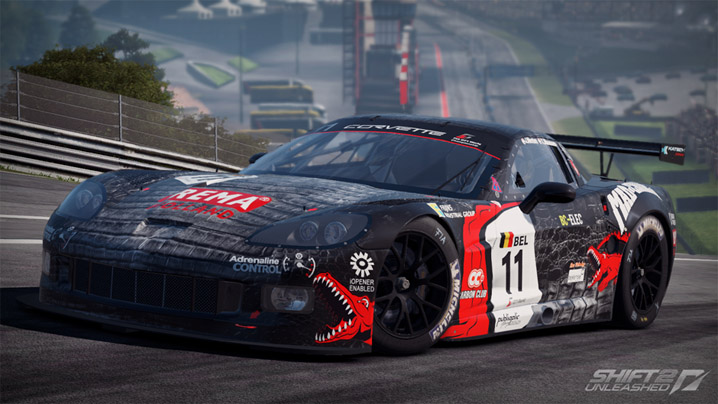
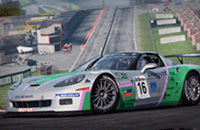
Need For Speed: Shift 2 - Corvette C6-R



IS it just me or is DRIFTING IMPOSSIBLE in this game? The car is just uncontrollable and the physics are way off with the G27 wheel!!! FRUSTRATING!!!!!! No clutch kick, and the car just spins out and does donuts?
Whats your take on it Solid? ANY SETTINGS WE CAN DO TO FIX DRIFTING??? :'(
(the RACE part of the game is awesome though and works flawlessly)
Agree ….was hoping to use this for off track practice given endorsements by VG Jr and Matt Powers. I play sim and arcade games pretty decently (have won cyber games nationally) AND actually compete in Formula Drift Asia …so this is very very frustrating and disappointing that it does NOT come close to real drifting using the wheel!!!
If there is some solution…please please please, can someone help me out? yooandeye@mail.com
I doubt you could get drifting right in a simulation because you can’t feel the inertia and sensory feedback.
Hey there, thanks a lot for your reviews, they were quite helpful to me in many ways.
Now, my question may sound stupid, but I just bought a brand new G27 so I am a beginner with its features and all. Thing is, I saw many people playing Shift 2 (and that is worth for other games too) with their G27, using the H-selector. Unfortunately I was not able to find a way to use this manual shifter in Shift2, so I was wondering if you had any clue of how to set the manual selector, in-game or with the profiler or anything, because this is getting really frustrating by now.
Thank you in advance for your answer and thanks for these you already provided with your articles, and I might come up with many other questions in the near future 😉
It’s shown in the big screenshot up above with the wheel picture. You select “Gears” and “Automatic clutch” options. Also note the labels on the wheel for toggling various assists.
thanks a lot for that quick answer, I feel a bit blind for not having seen this before lol.
unfortunately, even if it now works, it seems i cannot select the first and thrid gear with the selector, while the other one all work fine. is there something else i was too stupid to see or something?
oh and also, perhaps I’m asking in the wrong section, but is the original NFS Shift also supporing the shifter? because it does not seem to work on either manual or automatic clutch… thanks again :/
Well if the other gears are working fine, then maybe you need to remap the buttons to the right gears, which is in the step-by-step instructions above.
I wrote up an article on that here – http://solidlystated.com/software/logitech-g27-need-for-speed-shift/. Both NFS:Shift games have full H-shifter support and full force-feedback.
I am aware of the article about shift, and there is actually nothing that says what one has to set in order to make the shifter work.
Also, there is no place in the control settings where you can map all the gears individually in shift 2, so theres no way for me to remap it. I’ll keep you up about if I figure it out about that, but I still need help about original shift.
Alright, I got everything working like it should finally. It seems that switching presets from Separate to combined pedals and then remapping everything worked for both Shift1 and 2. many thanks again for your help!
Must have just been the button mappings. Keep in mind both Shift games use Separate pedals, not Combined, regardless of the preset name.
If you ever come across a racing game where your car won’t move when you hit the gas, it’s because your pedals are set up wrong.
Hi anyone help,i can’t get the brake pedal to work at all on shift 2 unleashed,i have G27 Logitec wheel.I have set it up from the options screen,it all works apart from the brakes.Only way i can play the game is with braking assist on(not much fun)Thanks Bert
do all 941-000045 models support 900 degrees?
Hi Karim- you specify a single model number followed by the plural word “models” so I’m not sure what you meant there, but all G27s support 900 degrees. While game support varies, the Logitech software should allow you to use 900° in any game.
Hi! guys i have a problem with my new g27 and this game! the problem is steering lock doesn’t work i change it to 900 degrees but it goes back to 360 every time i go to a race! i don’t know what to do! any help plz?? thanks. and my game is original.
Well, your problem may be that you just don’t save your settings. Its on the reight side of the keyboard, down under the enter button.
Hey everybody! I recently bought a G25 and bought this game just for it. The problem is i cannot find out how to map the individual gears from the H pattern 6 speed. I can only map a button for upshift and downshift. I have seen a number of youtube vids showing it is possible (i researched games with h pattern support for 6 months before buying this one) what am i missing? And how can i get it going right. Thanks in advance.
Hey, Ive got a few Major problems with the game!
First off settings are VERY unrealiable… One race i could have manual gearing next Auto the one after that manual WITHOUT even entering the settings menu same with others manual is just the one thats most noticable that and force feedback which seems to be random each race aswell! even if i restart it wont change if i go to the settings menu and change it to Manual and then race the race it gave me automatic in im STILL automatic! using same car as other races where im allowed manual same everything trackdoesnt have to do with it either (after testing)
Second off Theres crashes when i have my g27 plugged in! even if im not using the g27 still have a 10% chance of c rashing on menus and entering races!
These are gamebreaking bugs to me and i would love to have them fixed