

This article is part of our series: The Logitech G27 Racing Wheel for Casual Racing Gamers. Here, I cover setting up your G27 racing wheel to play Test Drive Unlimited 2. TDU2 was developed by Eden Games and published by Atari. TDU2 continues the tropical island open-world theme from the original Test Drive Unlimited.
This article will also apply to G25 owners. Of course, they will have to sacrifice a few extra button mappings in the control options.
Solid Tip: Looking for G27 drivers or Logitech Profiler software? Get it here.
| Logitech G27 Solid Series Articles | |
|---|---|
| 1. Casual Gamer vs Simulation Gamer | 11. Test Drive Unlimited |
| 2. Setting Up Your G27, Made Easy | 12. Test Drive Unlimited 2 |
| 3. Need For Speed: Carbon | 13. Burnout Paradise |
| 4. Need For Speed: Pro Street | 14. Race Driver: GRID |
| 5. Need For Speed: Undercover | 15. Split Second |
| 6. Need For Speed: Shift | 16. GTR Evolution |
| 7. Need For Speed: Shift 2 | 17. DiRT 2 |
| 8. Need For Speed: Hot Pursuit | 18. DiRT 3 |
| 9. Need For Speed: The Run | 19. Blur |
| 10. Need for Speed: Most Wanted | |
Before you begin
Unlike any of the previous 12 games detailed in this series, you cannot start this game directly from the Logitech Profiler. The game runs on TestDrive2.exe, so this is the file that the Profile must be created under. However, you must launch the game using UpLauncher.exe.
Attempting to setup the Profile with UpLauncher.exe won’t work with the game and it will ignore any settings you change.
Also, the wheel buttons get pre-mapped nicely. Steering, pedals, and shifter are already set correctly so don’t bother with those in the options.
TDU2 G27 Simple Setup
- Open the Logitech Profiler
- Select New > Profile
- Add TestDrive2.exe as a new game
- Open Specific Game Settings
- Check ‘Use Special Steering Wheel Settings’
- Set ‘Degrees of Rotation’ to your preference
- Leave ‘Report Combined Pedals’ UNchecked
- You must start the game with UpLauncher.exe
- In game, go to Options > Controls
- Select ‘Detect Device’
- Switch Keyboard to Logitech G27
- Select Yes to default controls
- Major controls are already mapped
- Change any additional buttons you like
- In game, go to Options > Game Settings
- Select your gearbox (auto/manual/paddles)
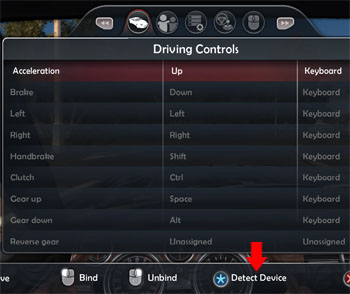 Select 'Detect Device' |
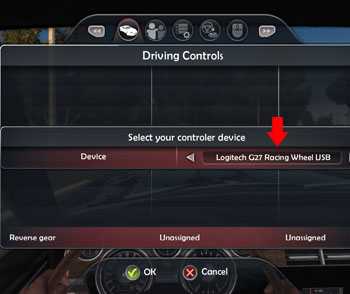 Select The G27 |
Additional Wheel Settings
You will also find “Controller Configuration” under the control options. For the purposes of simply getting your G27 setup and enjoying the drive, you actually should not mess with these. There are some basic tips below or you can refer to my advanced options article for full details.
The steering rotation is handled by the Logitech Profiler. This is not a simulation game, so I set mine to 200°, which matches the cars in-game. You can select up to the full 900° steering, but it will take you all day to turn a corner!
The Vibration feature may sound corny, but it actually allows you to feel the rumble of the road itself. With this slider all the way down, you won’t feel anything in the wheel when going in a straight line on asphalt. I suggest you leave it.
Also avoid adjusting Steering Sensitivity. Moving this slider up actually decreases steering to the point where your car will drive straight no matter what. Whatever this button is meant for, it sure doesn’t do it with the G27.
The other settings would make sense if this were a simulation. I recommend leaving them at the default, which is actually preset specifically for the Logitech wheel.
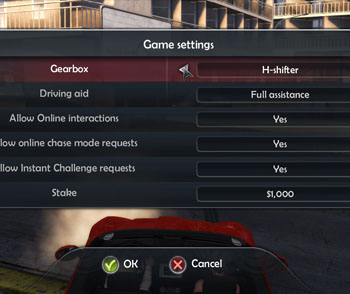
Select your transmission
Don’t Neglect the Transmission
Even though you map keys for paddles and H-shifter, your car is set by default to automatic.
Don’t forget to go to Options > Game Settings to set your gearbox. You have the choice of Automatic, Sequential (paddles), H-Shifter, or H-Shifter with Clutch.
Look at her! She looks great in red.



thanks for all your help, i find this site excellent.
keep up the good work brother.
Hey. When i follow this setup guide, it won’t work. In game the car revs up, and I can’t change any keys. What could be the problem?
You’re going to have to be a little more detailed in your problem for me to help
Okay. I do everything you have written. But when i start up the game I can’t use the steering wheel, the car goes at full RPM, and i can’t do anything abuot it. The only thing that is working is the shifter. If I use H-shifter + clutch, I can change gear, but if I try to go forward in 1. gear, the car stops, and then i can’t start it again.
Do you understand now? 😀
I can check further into that later, but some things to check:
1. make sure your wheel is working in other games
2. make sure no other controllers are plugged in to your PC
3. make sure your combined pedals box is not checked.
Thanks.
1. It is working greaton F1 2010 and LFS
2. Only keyboard and mouse
3. It is not checked.
I just reinstalled this game on a new machine and it worked great.
I went into my profile and CHECKED the combined pedals box to see what happens. The car just revs up to the redline and stays redlined. I can switch through the gears, but nothing else. That’s the same issue.
Go look at your Global Device Settings in the Logitech Profiler. It might be overriding your game setting.
I really do not understand what’s wrong. I have tried everything. Both adding functions to the axis of the steering wheel, speeder and brake, and not adding them. Nothng helps. I have both checked and unchecked the combined pedals.
No matter what i do, the car just ravs’ up and stay there. But it is like my game doesn’t know the wheel is plugged in. In other games when I start up, the wheel gets harder to turn, but not in TDU 2.
It really is frustrating when other people can get it ti work.
Hi guys. This happened to me as well once, the car reved up for no reason but I managed to fix it by simply pressing the accelerator pedal. Combined pedals setting was unchecked. This bug usually occurs at the begining of the game after going to the road.
By the way, you CAN use 900 degree rotation!!!!! All you have to do is put the steering sensitivity slider all the way to the left in the TDU settings. It appears that the sensitivity slider is backwards.
What is realy annoying is enormous sensitivity of the brakes and akward and absolutely frustrating behaviour of the clutch. (even for an arcade game) You either spin the wheels or stall. I tried to set brake sensitivity to 0% in specific game settings, tried various dead zone settings and different brake linerity… Nothing had helped. Anyone got any thoughts?
My friend is having problems with game and steering. He turns his wheel a literal 5 degrees and he makes a 90 degree turn. He has messed with all setting and pre made wheel setups and nothing works. Whats going on with his wheel? I really want to get the game, but it will be boring by myself.
Did you check out the advanced options article? There are a ton of options that affect how the steering works in the game itself and then you also have the Logitech Profiler settings outside the game (both specific game settings and global settings).
Hello there.
I have previously played TDU2 with my G27 steering wheel, had a little problems with setting it up but at the end it worked out quite well. However, for a while ago I got a new PC and stopped using my G27, untill now when I had the feeling to get up from the cellar again. I installed Test Drive Unlimited and Test Drive Unlimited 2 (Steam), and started fixing up TDU. It worked flawlessly, however I had to use combined pedals for some reason.
When I got to TDU2, my car, just as the other stated, starts revving and I can’t get anywhere. After figuring a bit, I finally found a way to stop this by simply unplugging and replugging the steering wheel.
Now I have another problem instead. The wheel can only turn 200 degrees and have a h**l of a force feedback, which I find quite annoying. I want higher degree and less FFB. The thing is, I can’t fix it and almost makes no difference at all when I change the ingame settings. And when I change anything from the Profiler, I get this revving bug again and I have to replugg the wheel again. And the degrees won’t change at all.
Any ideas?
In every racing game, if you have the pedals set backwards, it does the revving thing. Go back into the profiler and swap out the option. Also note that you have a Global Device Settings and then Specific Game Settings, so you want to be in the game profile for TDU2 and using Specific Game Settings to overwrite any global setting.
The same should hold true for 900 degree steering and other options.
Finally, the profiler works on the fly, so you can be sure whether or not its actually working with the right .exe by alt-tabbing out of the game, changing the settings, and then alt-tabbing back into the game to see if it changes.
Yeah. I know this. I have tried to make changes in both global and specific game settings but it makes no difference. What do you mean with the backwards thing?, I’ve seen no such option.
However, sorry for double post but I found no way to edit an already posted message.
As I said, the revving is no longer a problem for me.
The only problem is that I can’t change the degree nor the FFB.
If the profiler isn’t having an effect, then it likely is attached to the wrong .exe file. I’m not sure what the steam version is running the game with, but you should be able to see it in Task Manager while the game is running
Yup, I’ve looked up the exe file through the Task Manager. TestDrive2.exe from steam/steamapps/common/Test Drive Unlimited 2
However, it should be the right exe, because the wheels get this revving problem as soon as I change anything in the profiler. However, even if I change something, and then reconnect the wheel as I said before, the revving thing is gone but the thing have seemed to made no effect.
Alright. Im going to make a summary of my problem so people who have a similar situation might have some help.
For the revving thing, unplugg and reconnect the wheel to the USB, you can do this while TDU2 is on.
If you still have problem, then go and remove anything that have to do with combined axis. You don’t want this. There are three locations which you might find this option. In the global, specific and windows setting. The windows setting can be found under (raw translation) entity and then steeringentity. Then properties and settings. You will figure it out.
And with the problem that the profiler don’t affect the game, and that you cant change the degree to 900 or anything else. For me, I made two profiles, one for the launcher and one for the exe. I changed the options as I wanted them. Restarted the game, restarted the profiler and unplugging the wheel.
There might be an easier way, however, this worked for me.
Wow! Thanks,I was nearby throw my g27 out of the window, thanks mate!